
Yesterday, Budget Planner was added to the official Obsidian Community Plugins directory.
This changes one small but important thing: installation is now boring. Open Settings → Community Plugins → Browse, search for Budget Planner, and click Install. No downloading release files and copying them into .obsidian/plugins/ by hand.
Budget Planner turns a plain Markdown code block into an interactive budget table:
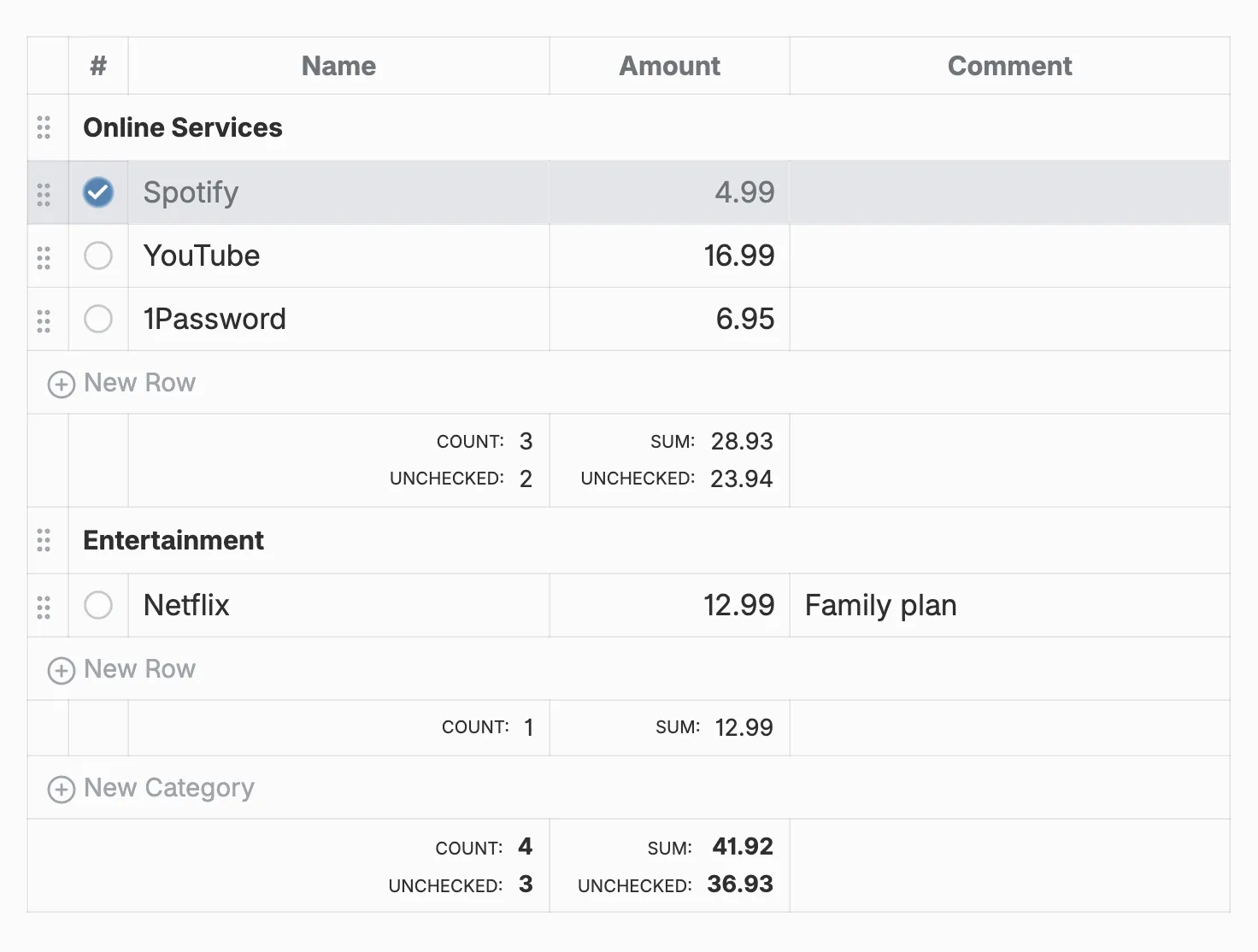
In Obsidian’s editing view, you can edit cells inline, mark payments, drag rows between categories, sort columns, and see totals. Comments support wikilinks, external links, bold text, and tags.
The file itself stays plain text. There is no separate database and no custom format hidden behind the UI. If the plugin is disabled, the budget is still a readable budget block that can be edited by hand.
Getting into the directory was mostly unglamorous work: matching Obsidian’s manifest and command conventions, fixing review-bot warnings, pinning the Obsidian development dependency, and making the production build reproducible from a clean checkout. Version 1.2.8 is the result of that cleanup.
The directory page showed 222 downloads when I checked it today. A modest number, but more than enough to expose assumptions that survived local testing.
You can install Budget Planner from the Obsidian directory. The source code is available on GitHub under the MIT license.